
SOFTWARE & AUTOMATION
FOR BAKERIES.

RECIPE & PRODUCTION SOFTWARE FOR BAKERIES
Your expertise.
In every batch.
Patriq turns your recipes into daily production: calculate batch quantities, guide manual weighing and control dosing and mixing. Your team gets clear instructions; you can see the progress and results in the office.
From a single weighing station to several production lines. Choose the functions your bakery needs and connect equipment from any manufacturer.
INSIDE PATRIQ
-

- Guided weighing — See which ingredient to add, how much is missing and whether the weight is within tolerance.
-

- Small ingredient supply — Check the ingredients available in connected bins and their stock quantities.
-

- Water dosing — Compare required and actual water quantity and temperature.
-

- Office recipe editor — Manage recipe groups, dough temperature and allowed adjustments in the office.
-

- Illustrated work instructions — Give operators product photographs and the settings they need at their station.
-

- Traceability — Find the production batches in which a recorded ingredient lot was used.
Production and office screens from example installations. Language and layout vary with the setup.
FROM YOUR FIRST RECIPE TO YOUR LAST BATCH
What would make
your working day easier?
Explore six parts of bakery production and the Patriq functions behind them. The screenshots show what your team works with.
01 / RECIPES AND PRODUCTION PLANNING
Plan the products.
Patriq calculates the batches.
Enter the products and quantities you need. Patriq calculates dough and ingredient requirements from product counts, piece weights or a total dough quantity. Products made from the same dough can share one recipe, making it easier to plan a varied range.
Prepare the day at your desk: manage recipes and variants, set batch quantities and assign work to production stations. Your team sees the recipes intended for its station; the office can follow which batches are planned, running or complete.
Keep more than quantities in the recipe. Dough temperatures, mixing stages and work instructions belong with the formulation. Pre-doughs and other subrecipes can be included, while authorised adjustments are recorded against the batch without changing the master recipe.
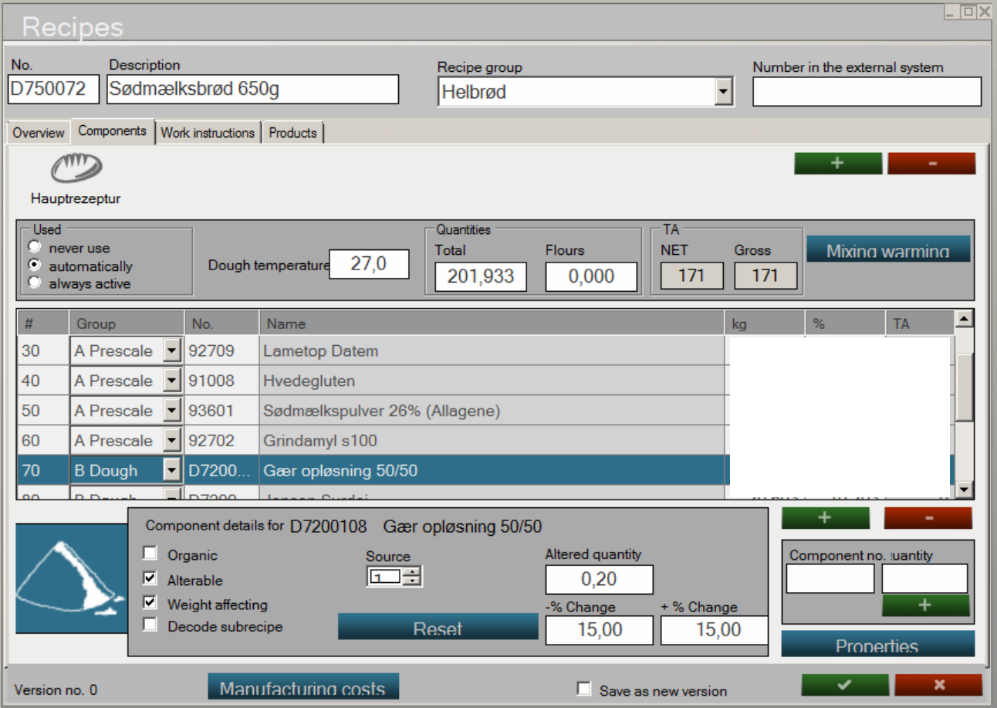
Recipe editing
Recipe editing in the office: ingredients, dough temperature and permitted adjustments in one place.
Prepare before the shift
Update recipes and instructions in the office, ready for the stations that need them.
Scale the recipe to the order
Calculate from the number of products required instead of working out each ingredient again.
Plan staged preparation
Weigh selected ingredients in advance and continue the batch later. Include pre-dough and returned dough in the calculation.
02 / MANUAL WEIGHING AND AUTOMATIC DOSING
A clear target.
For every addition.
Patriq shows the operator what to add and how much is still missing. Large touch controls are designed for work at the production terminal. The weighing display counts down towards zero, and tolerance checks help operators stay within the recipe’s limits.
Your team weighs the ingredients that need manual handling while connected equipment doses flour, water, small ingredients and liquids. Both belong to the same batch, with actual quantities recorded together.
If several stations share a silo or dosing unit, Patriq coordinates their requests. Operators can follow their own batches while the control system manages access to shared equipment.
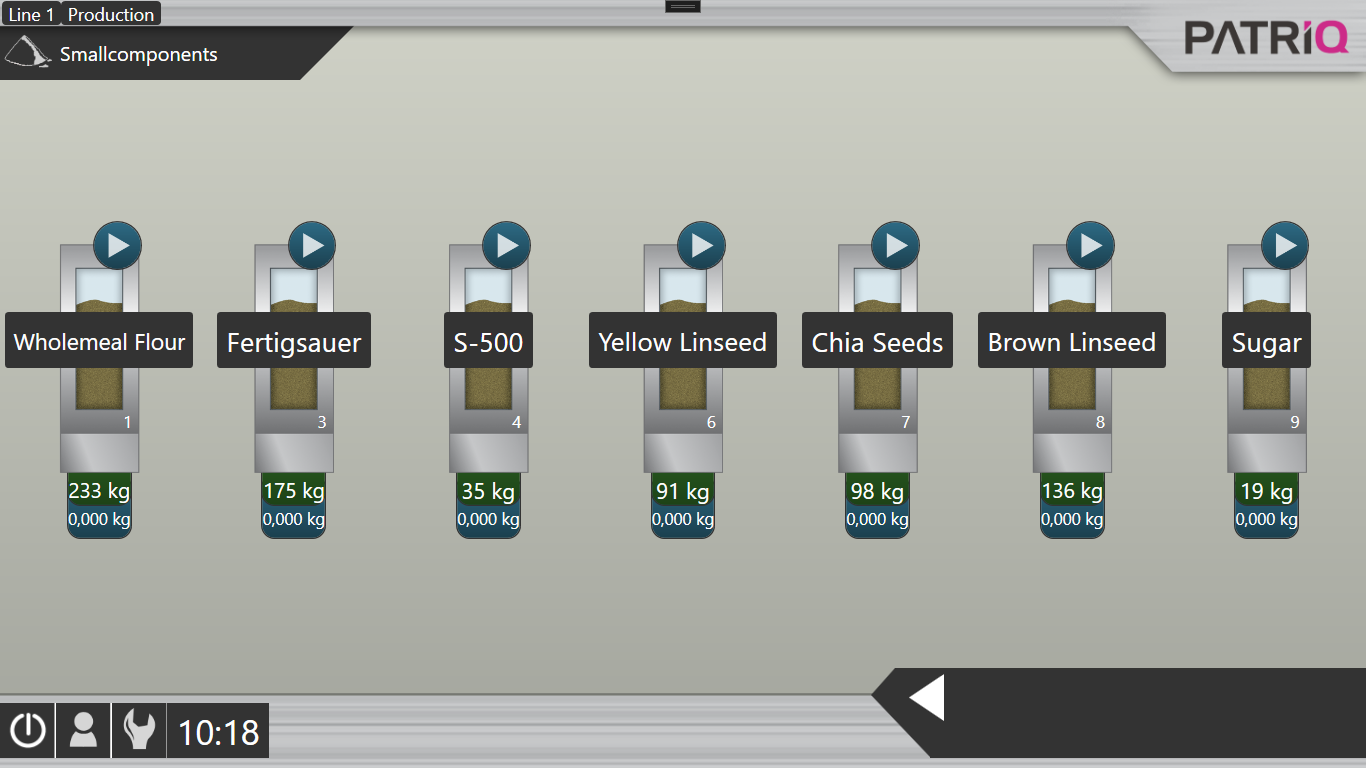
Small ingredient supply
Ingredient supply in Patriq: see the connected bins, their contents and the dosing controls.
Work with your containers
Tare the scale, use known container weights or change containers during preparation. The workflow can follow the way your team weighs ingredients.
Send ingredients to the right station
Coordinate ingredient sources and receiving points, including equipment shared by several production lines.
Account for material still in motion
Dosing corrections can use previous results to adjust the stop point. This helps account for material that continues flowing after the drive stops.
03 / DOUGH TEMPERATURE AND MIXING
Flour temperature changes.
Your water calculation should too.
The right water temperature depends on more than the recipe alone. Patriq uses ingredient quantities and temperatures, the target dough temperature and heat from mixing to calculate the required water temperature. This helps your team respond to changing production conditions.
Where ice is part of the setup, Patriq can calculate the water-and-ice balance when water alone cannot provide enough cooling. Temperature readings can come from probes or operator input. Recorded dough temperatures help refine the correction for later batches.
For compatible mixers, speed changes, mixing times, temperature targets and pauses are stored in the recipe. Late additions and operator confirmations can be included, so the method follows the batch rather than relying on memory.
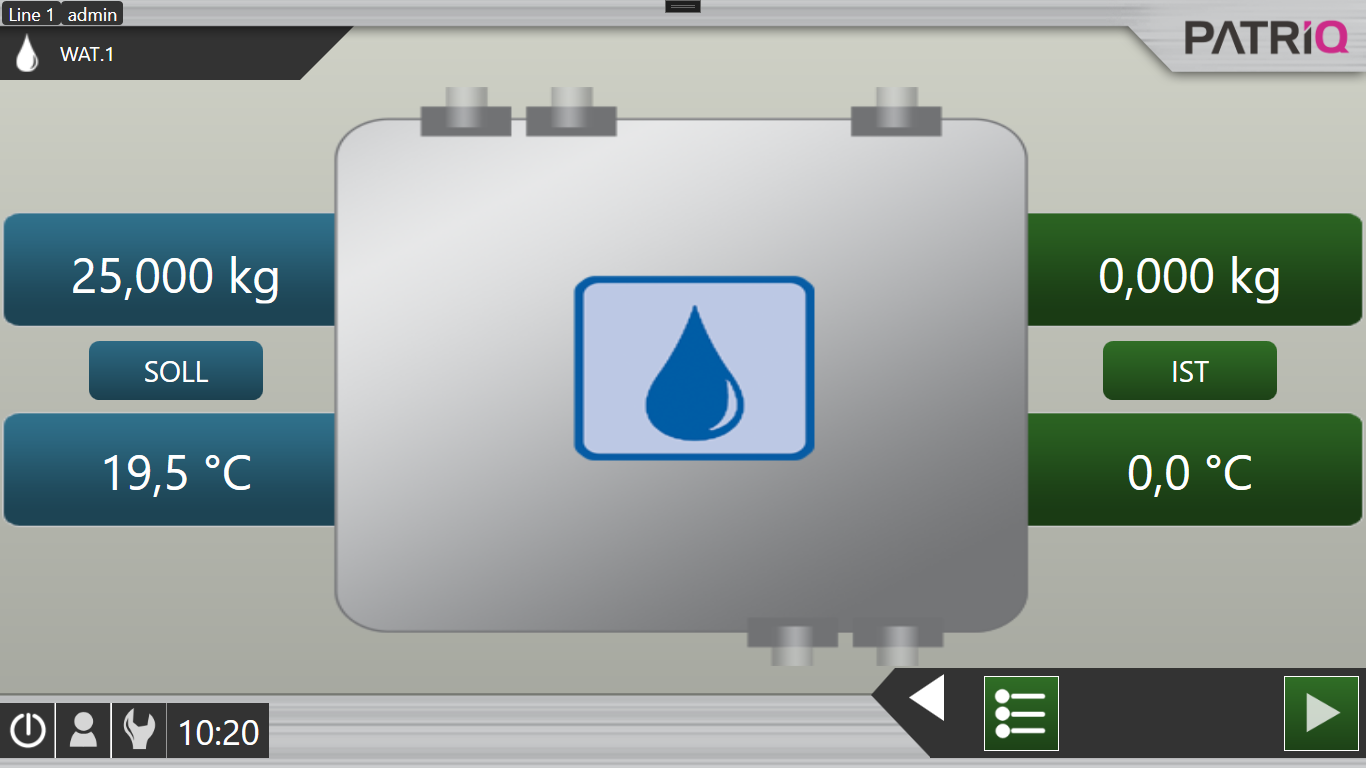
Water quantity & temperature
Water dosing: compare the required quantity and temperature with the values reported by the equipment.
Follow the dough into the next stage
Carry batch identity, quantities and timing through dough rest, container handover and workup.
Include liquid and pre-dough preparation
Combine dosing, heating or cooling, agitation and transfer in the recipe for connected tank equipment.
Make cleaning repeatable
Store cleaning sequences for compatible equipment, with defined temperatures, circulation and discharge steps.
04 / INSTRUCTIONS FOR THE TEAM
Your experience.
Available on every shift.
A good recipe also contains knowledge: how the dough should look, which settings to use and how to handle it. Record those details with photographs, text and tables so colleagues can look them up at their workstation.
Show each team the information it needs. Preparation instructions at weighing, shaping details at workup, baking information by the oven. Maintain the instructions in the office and make them available at the relevant stations.
You do not need to automate a machine to add an information station. Staff can select a product and consult its instructions. New colleagues and people moving between stations have a practical reference without having to find the one person who knows.
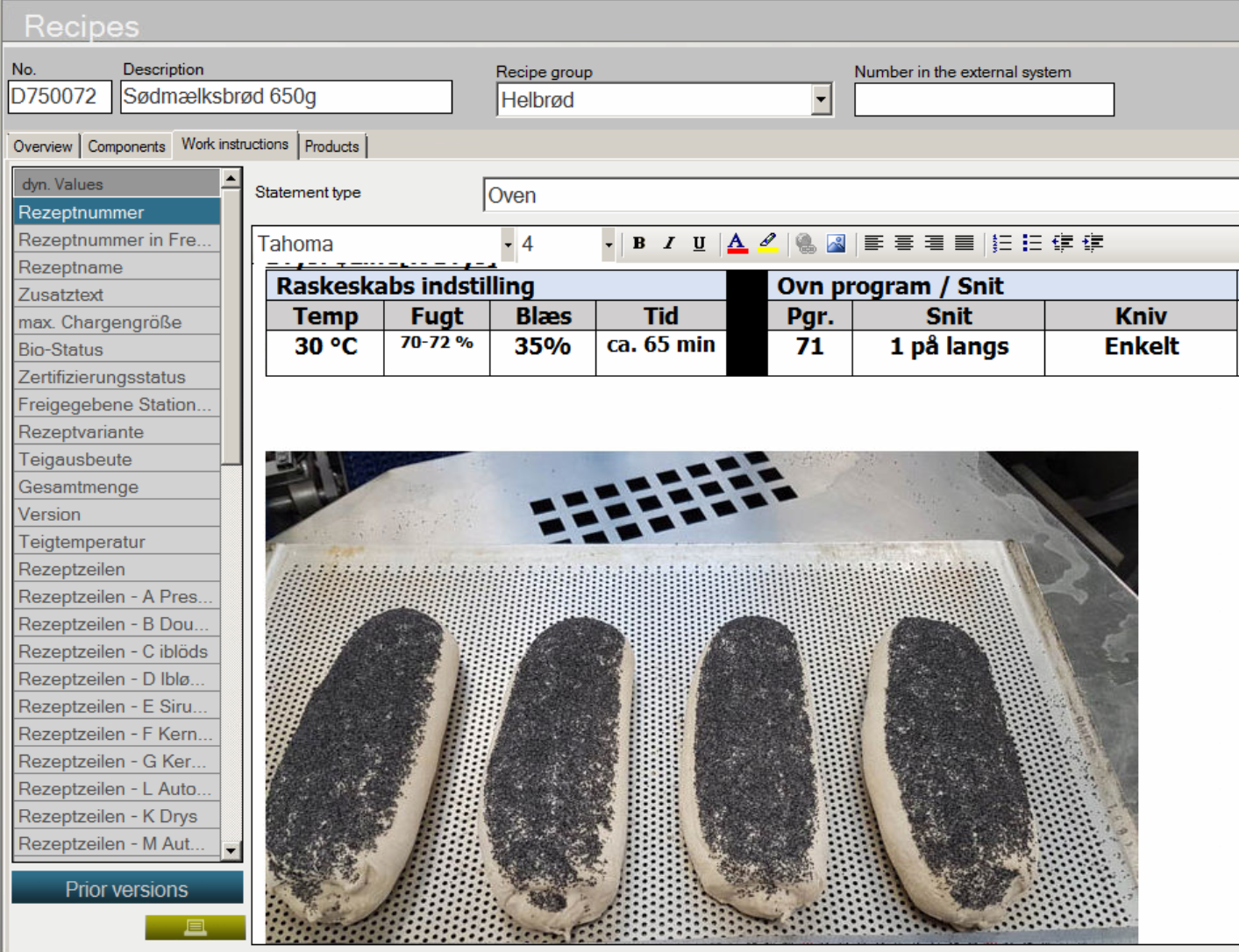
Illustrated work instructions
Illustrated instructions combine product photographs with proofing, preparation and oven settings.
Show what good looks like
Use photographs for shaping and product appearance, and tables for machine settings.
Place guidance where it matters
Let staff open instructions when needed, or make them a required part of a selected production step.
Keep each station focused
Choose the recipes, information and permissions appropriate to each role and workstation.
05 / BATCH RECORDS AND MATERIAL TRACEABILITY
A different result?
Go back to the batch.
When a dough behaves differently, a production record is more useful than guesswork. Review the recipe, actual ingredient quantities, recorded temperatures and timing to investigate what changed.
Track ingredient lots from receipt through their recorded use in production. Barcode-supported identification and stock movements help relate a raw material lot to the batches that used it. Together we define where information is captured so the records answer the questions your business needs to ask.
Stock and consumption data also help with purchasing. Minimum-stock suggestions and supplier orders support replenishment; participating suppliers can be given access to selected stock information.
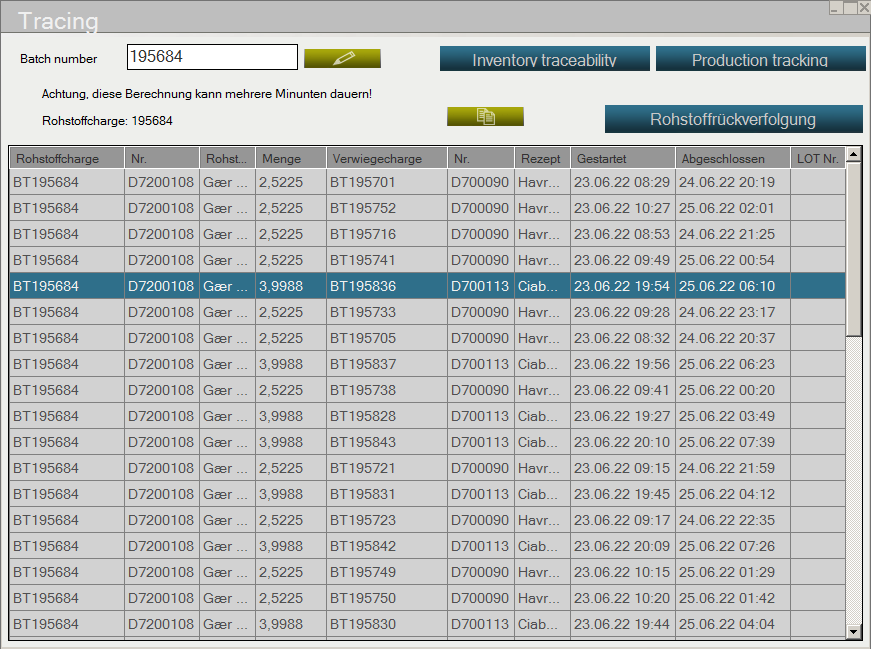
Material use & production batches
Traceability view: follow a recorded ingredient lot into the production batches in which it was used.
See what remains to be produced
Follow planned, running, interrupted and completed batches from the office.
Add checks after mixing
Optional weight-check stations and image capture can extend the production record beyond dough preparation.
Bring deviations to attention
Use configured notifications and reports to get relevant production information to the people responsible.
06 / EXISTING MACHINES AND BUSINESS SOFTWARE
Keep your equipment.
Connect your production.
Your machinery does not have to come from one manufacturer. We integrate existing silos, dosing systems and process equipment with Patriq, so recipe quantities, machine actions and production records work together.
The connection is engineered for each machine. We use standard OPC communication and our own Patriq.IO modules, depending on the equipment. Suitable machinery stays in place; electrical panels are replaced only where necessary.
An ERP connection can bring product demand into production planning and return production results to the office system. We agree which data should be exchanged and how the two systems will work together, reducing the need to enter the same information twice.
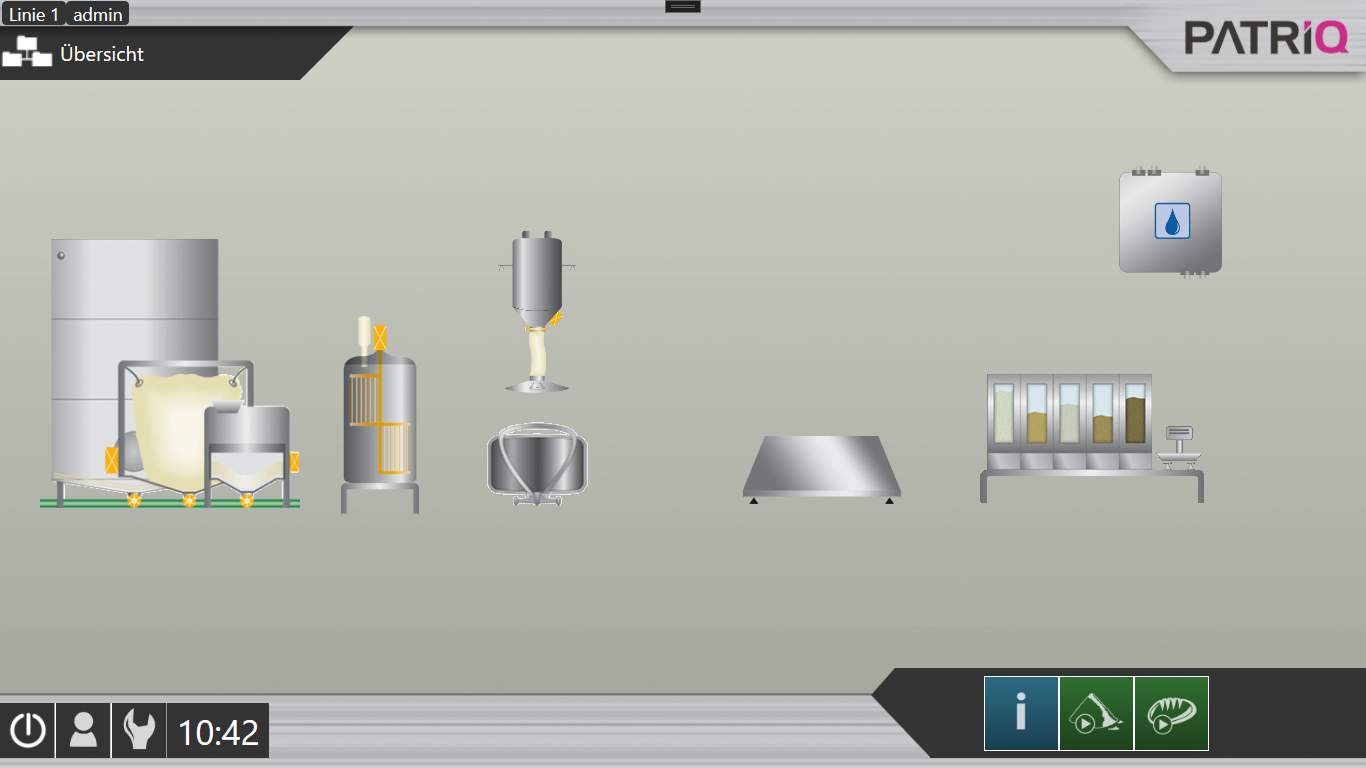
Your connected plant
The plant overview shows how ingredient storage and dosing equipment relate to the current production.
Choose a useful starting point
Begin with recipe management and guided weighing, or connect automatic dosing and planning across several lines.
Locate interruptions
Plant overviews, equipment status and diagnostics help identify where a production sequence has stopped.
Expand when you need to
Add workstations, software modules and equipment connections as your requirements change.
Patriq is configured and licensed around your bakery. An optional software maintenance contract gives you ongoing improvements and new functions within the agreed scope. Additional modules and integration work are available separately.
SEE PATRIQ WITH YOUR PRODUCTION IN MIND
Your recipes.
Your questions. Our demo.
Bring a typical recipe and tell us how you work. We’ll show you the functions that could help, from preparing the day to reviewing a completed batch.
FROM RECIPE TO PRODUCTION.
© 2026 Nio Mechatronik GmbH
Salzburger Straße 44 · 4690 Schwanenstadt · Austria